How a REST Client Should Handle 503 Service Unavailable: Retries with Backoff in Spring

Your nightly job sends 50,000 articles to a partner’s API, in batches of 1,000. At batch 23, the API answers 503 Service Unavailable. What should your client do? Give up, and the data is incomplete. Retry immediately, and you make an overloaded server even slower. This post shows how a REST client should handle a 503: which errors to retry, how long to wait, and how Spring Framework 7 does it with one annotation.
In this article 7 sections
What a 503 Means
The HTTP status code 503 Service Unavailable says that the server can’t handle the request right now, but probably will later. Common causes:
- The server is down for scheduled maintenance.
- The server is overloaded by too much traffic.
- A service the server depends on, such as a database or another API, is failing.
The server may add a Retry-After header that says how long to wait. The important word is temporarily: a 503 is an invitation to try again later, not a final answer.
The Client Can’t Control the Server
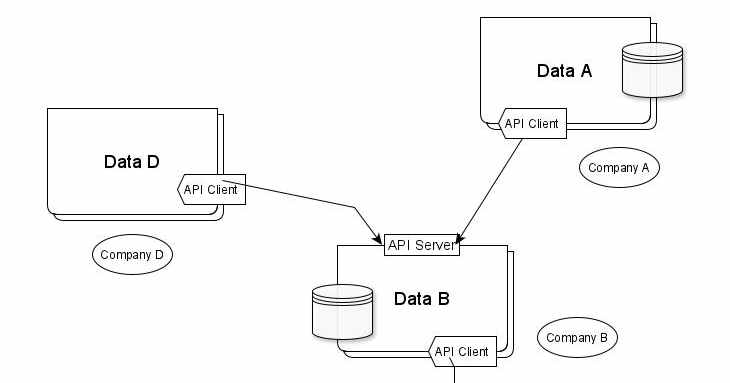
Business-to-business (B2B) integrations are a typical case. One company’s application is the client, the other company’s API is the server, and the client has no say in how the server is built, deployed or scaled.

The first version of our client caught the exception, wrote it to the log and continued with the next batch. The job finished “successfully”, and 1,000 articles were silently missing. Somebody had to read the logs, call the partner company, and send the batch again by hand.
The opposite reaction is just as bad: retrying in a tight loop, three times in a row without a pause. A server that’s overloaded receives even more requests, exactly when it can handle the fewest. If hundreds of clients do the same, they keep the server down.
Which Errors Should You Retry?
Retry only when the same request has a real chance of succeeding later:
| Response | Retry? | Why |
|---|---|---|
| 503 Service Unavailable | Yes | Temporary by definition |
| 429 Too Many Requests | Yes | Wait until your limit resets |
| 502 Bad Gateway, 504 Gateway Timeout | Yes | Usually a temporary network or proxy problem |
| Timeout, connection refused | Yes | The server may be restarting |
| 400, 401, 403, 404, 422 | No | The same request will fail again |
| 500 Internal Server Error | With care | Can be a bug, which a retry won’t fix |
Is the request safe to repeat? GET, PUT and DELETE are idempotent: sending them twice has the same effect as sending them once. Our request is a POST, but it’s a search, so repeating it changes nothing. A POST that creates something, such as an order, is different: if the first attempt actually reached the server and only the response got lost, a retry creates a second order. APIs solve this with an idempotency key, a unique ID the client sends with the request, so the server can recognize a repeated request.
A Retry Loop with Backoff
A good retry waits longer after each failure (exponential backoff: 1, 2, 4 seconds…), adds a random part to each delay (jitter, so that many clients don’t retry at the same moment), respects the server’s Retry-After header, and gives up after a few attempts. Here it is with Spring’s RestClient:
1
2
3
4
5
6
7
8
9
10
11
12
13
14
15
16
17
18
19
20
21
22
23
24
25
26
27
28
29
30
31
32
33
34
35
36
37
38
39
public class ArticlesClient {

  private static final Logger logger = LoggerFactory.getLogger(ArticlesClient.class);

  private static final int MAX_ATTEMPTS = 4;
  private static final Duration INITIAL_DELAY = Duration.ofSeconds(1);
  private static final Duration MAX_DELAY = Duration.ofSeconds(30);
  private static final Set<Integer> RETRYABLE_STATUS_CODES = Set.of(429, 502, 503, 504);

  private final RestClient restClient;

  public ArticlesClient(RestClient restClient) {
    this.restClient = restClient;
  }

  public SearchResponse searchArticles(List<String> articleNumbers) {
    for (int attempt = 1; ; attempt++) {
      try {
        return restClient.post()
            .uri("/articles/search")
            .contentType(MediaType.APPLICATION_JSON)
            .body(new SearchRequest(articleNumbers))
            .retrieve()
            .body(SearchResponse.class);
      } catch (RestClientException e) {
        if (attempt == MAX_ATTEMPTS || !isRetryable(e)) {
          throw e;
        }
        Duration wait = retryAfter(e).orElse(backoff(attempt));
        if (wait.compareTo(MAX_DELAY) > 0) {
          throw e;   // the server asks us to wait longer than we're willing to
        }
        logger.warn("Attempt {} of {} failed: {}. Retrying in {} ms",
            attempt, MAX_ATTEMPTS, e.getMessage(), wait.toMillis());
        sleep(wait);
      }
    }
  }
}
The helper methods decide whether and how long to wait:
1
2
3
4
5
6
7
8
9
10
11
12
13
14
15
16
17
18
19
20
21
22
23
24
25
26
27
28
29
30
31
32
33
34
35
36
37
38
39
40
41
42
43
private static boolean isRetryable(RestClientException e) {
  if (e instanceof RestClientResponseException responseError) {
    return RETRYABLE_STATUS_CODES.contains(responseError.getStatusCode().value());
  }
  return e instanceof ResourceAccessException;   // timeout, connection refused
}

// 1 s, 2 s, 4 s ... up to MAX_DELAY, each with random jitter between half and the full value
private static Duration backoff(int attempt) {
  long cap = Math.min(MAX_DELAY.toMillis(), INITIAL_DELAY.toMillis() << (attempt - 1));
  return Duration.ofMillis(ThreadLocalRandom.current().nextLong(cap / 2, cap + 1));
}

// Retry-After is either a number of seconds or an HTTP date
private static Optional<Duration> retryAfter(RestClientException e) {
  if (!(e instanceof RestClientResponseException responseError) || responseError.getResponseHeaders() == null) {
    return Optional.empty();
  }
  String value = responseError.getResponseHeaders().getFirst(HttpHeaders.RETRY_AFTER);
  if (value == null) {
    return Optional.empty();
  }
  try {
    return Optional.of(Duration.ofSeconds(Long.parseLong(value.trim())));
  } catch (NumberFormatException notSeconds) {
    try {
      ZonedDateTime retryAt = ZonedDateTime.parse(value.trim(), DateTimeFormatter.RFC_1123_DATE_TIME);
      Duration wait = Duration.between(ZonedDateTime.now(), retryAt);
      return Optional.of(wait.isNegative() ? Duration.ZERO : wait);
    } catch (DateTimeParseException invalid) {
      return Optional.empty();
    }
  }
}

private static void sleep(Duration duration) {
  try {
    Thread.sleep(duration);
  } catch (InterruptedException e) {
    Thread.currentThread().interrupt();
    throw new IllegalStateException("Interrupted while waiting to retry", e);
  }
}
The request and response are records:
1
2
3
public record SearchRequest(List<String> articleNumbers) {}
public record SearchResponse(List<Article> articles) {}
public record Article(String articleNumber, String name) {}
Don’t Lose the Batches That Still Fail
Even with retries, a batch can fail, for example when the partner’s API is down for an hour. Then the job must keep the data, not only a log line:
1
2
3
4
5
6
7
8
9
10
11
12
13
14
public List<List<String>> searchAll(List<String> articleNumbers) {
  List<List<String>> failedBatches = new ArrayList<>();
  for (int from = 0; from < articleNumbers.size(); from += BATCH_SIZE) {
    List<String> batch = articleNumbers.subList(from, Math.min(from + BATCH_SIZE, articleNumbers.size()));
    try {
      SearchResponse response = articlesClient.searchArticles(batch);
      save(response.articles());
    } catch (RestClientException e) {
      logger.error("Batch starting at {} failed after all retries: {}", from, e.getMessage());
      failedBatches.add(List.copyOf(batch));   // keep the data: retry later or report it
    }
  }
  return failedBatches;
}
The caller can store the failed batches in a table, send them again in the next run, or notify the team. In each case, nobody needs to search the logs.
Try It
I ran the client against a local test server that answers 503, then 503 with Retry-After: 2, then 200:
1
2
3
4
5
6
server: call 1 -> 503
WARN ArticlesClient -- Attempt 1 of 4 failed: 503 Service Unavailable: [no body]. Retrying in 618 ms
server: call 2 -> 503 (Retry-After: 2)
WARN ArticlesClient -- Attempt 2 of 4 failed: 503 Service Unavailable: [no body]. Retrying in 2000 ms
server: call 3 -> 200
result: SearchResponse[articles=[Article[articleNumber=4711, name=Potatoes]]]
The first wait is a random value from the backoff, and the second is exactly the 2 seconds the server asked for. In the other test runs, a 400 Bad Request failed immediately without a retry, a server that always answered 503 got four attempts with growing delays (0.8 s, 1.6 s, 2.1 s) before the client gave up, and a Retry-After of 120 seconds made the client stop instead of waiting.
To see a real 503 response, use the public test service httpbin.org:
1
2
3
$ curl -i https://httpbin.org/status/503
HTTP/1.1 503 SERVICE UNAVAILABLE
Content-Length: 0
The Spring Framework 7 Way: @Retryable
Since Spring Framework 7 (Spring Boot 4), retries are built into Spring itself, with no extra library. Enable them once:
1
2
3
4
@Configuration
@EnableResilientMethods
public class ResilienceConfig {
}
Then annotate the method:
1
2
3
4
5
6
7
8
9
10
11
12
13
14
15
16
17
18
19
20
21
22
23
24
25
26
27
28
29
@Service
public class ArticlesService {

  private final RestClient restClient;

  public ArticlesService(RestClient restClient) {
    this.restClient = restClient;
  }

  @Retryable(
      includes = {
          HttpServerErrorException.ServiceUnavailable.class,   // 503
          HttpServerErrorException.BadGateway.class,           // 502
          HttpServerErrorException.GatewayTimeout.class,       // 504
          HttpClientErrorException.TooManyRequests.class,      // 429
          ResourceAccessException.class },                     // timeout, connection refused
      maxRetries = 3,
      delay = 1000,
      multiplier = 2,
      maxDelay = 30_000,
      jitter = 250)
  public SearchResponse searchArticles(List<String> articleNumbers) {
    return restClient.post()
        .uri("/articles/search")
        .body(new SearchRequest(articleNumbers))
        .retrieve()
        .body(SearchResponse.class);
  }
}
In my test, this method also received 503, 503 and 200, with retries after about 1 and 2 seconds, and a 400 was not retried. The method itself contains no retry logic at all.
Which one should you use? @Retryable is shorter and keeps the business code clean, and it’s the right choice in most cases. It can’t read the Retry-After header, though, because it only sees the exception type. When an API sends Retry-After, typically with 429 and 503, the loop above respects it. On Spring Boot 3, the Spring Retry library offers a similar @Retryable.
Best Practices Checklist
- Retry only errors that can succeed later: 429, 502, 503, 504 and timeouts.
- Wait with exponential backoff and jitter, and respect
Retry-After. - Limit the number of attempts and the longest wait.
- Make sure a repeated request is safe; use idempotency keys for requests that create data.
- Never lose data: keep failed requests for a later retry or a report.
- On the server side, return
Retry-Afterwith your 503 and 429 responses. The rate limiting post shows how, and you can load-test it with concurrent clients.
Retries, timeouts and idempotency are where distributed systems get hard: what happens when a request is processed twice, or a response never arrives? This book explains these problems better than any other:

“What happens when the service you call is down?” is a standard question in backend and system design interviews. Practice with real interview questions:
“If this article helped you, help me create the next one.”
☕ Buy me a coffee