
Generate a Spring Boot Server from an OpenAPI Spec with Swagger Codegen
You’ve designed your API. Now comes the boring part: writing controllers, models and request mappings that only repeat what the spec already says. Swagger Codegen writes that code for you. In a few minutes you’ll go from an OpenAPI file to a running Spring Boot server with live Swagger UI documentation, and all that’s left for you is the business logic.
This series:
- Design the API with OpenAPI 3
- Generate a Spring Boot server with Swagger Codegen (this post)
- Implement it with Spring Boot, Gradle and OpenAPI
Once you have learned how to design APIs with Swagger and OpenAPI, we will proceed to generate the stub code for a RESTful web service with Spring.
In programming, a stub is an incomplete method. It already has the interface of the final method, but it doesn’t yet perform the full functionality. Instead, it returns “mock” or “dummy” data.
Why Generate Code from the Spec?
- The API and its documentation can’t drift apart, because both come from the same file.
- Frontend and backend teams can work in parallel as soon as the contract is agreed.
- You skip hours of boilerplate and start with code that compiles and runs.
Generating the backend
-
Open your OpenAPI file (apifinance) in Swagger Editor.
-
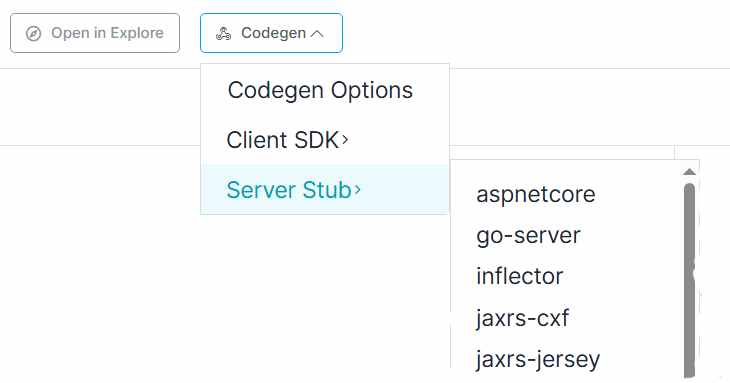
Click Codegen -> Server Stub in the menu bar. Swagger Editor will show you the backend technologies for which it can build code.
-
Click spring. Within seconds, your browser will prompt you to download a zip file.
-
Save the file on your drive.
-
Extract the zip file into a directory.
-
Open the directory in a code editor or IDE, such as IntelliJ IDEA.
By default, Swagger Codegen creates a Spring Boot project built with Maven. Let’s see the project structure:
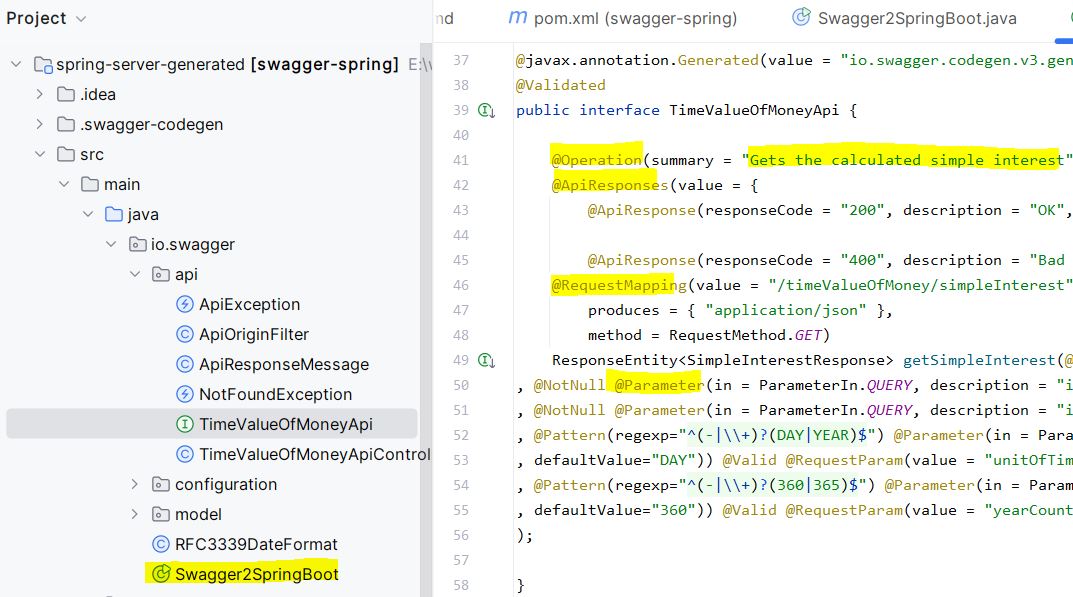
The underlying library integrating Swagger into Spring Boot is springdoc-openapi.
Codegen is only as good as the spec you feed it. If you want to design APIs that are easy to generate, document and use, this is the book:
We typically use a backend composed of controllers and services in many projects.
The generated TimeValueOfMoneyApiController class, which implements the TimeValueOfMoneyApi interface, already has the right method signature, parameters and response type. Until you implement it, it returns a sample JSON body with HTTP status 501 Not Implemented:
1
2
3
4
5
6
7
8
9
10
11
12
13
14
15
16
17
18
19
20
21
22
23
24
25
26
27
28
29
30
31
32
33
34
public class TimeValueOfMoneyApiController implements TimeValueOfMoneyApi {

  private static final Logger log = LoggerFactory.getLogger(TimeValueOfMoneyApiController.class);

  private final ObjectMapper objectMapper;

  private final HttpServletRequest request;

  @org.springframework.beans.factory.annotation.Autowired
  public TimeValueOfMoneyApiController(ObjectMapper objectMapper, HttpServletRequest request) {
    this.objectMapper = objectMapper;
    this.request = request;
  }

  public ResponseEntity<SimpleInterestResponse> getSimpleInterest(
    BigDecimal principal,
    BigDecimal interestRate,
    BigDecimal time,
    String unitOfTime,
    BigDecimal yearCountConvention) {
    String accept = request.getHeader("Accept");
    if (accept != null && accept.contains("application/json")) {
      try {
        return new ResponseEntity<SimpleInterestResponse>(
        objectMapper.readValue("{\n  \"simpleInterest\" : 0\n}",
        SimpleInterestResponse.class), HttpStatus.NOT_IMPLEMENTED);
      } catch (IOException e) {
        log.error("Couldn't serialize response for content type application/json", e);
        return new ResponseEntity<SimpleInterestResponse>(HttpStatus.INTERNAL_SERVER_ERROR);
      }
    }
    return new ResponseEntity<SimpleInterestResponse>(HttpStatus.NOT_IMPLEMENTED);
  }
}
The functionality of the application resides in services that the controllers can call as needed, but at the moment they are not implemented.
Let’s run the main method of the Swagger2SpringBoot class. The Apache Tomcat web server is embedded.
1
2
3
4
5
6
7
8
9
10
11
12
13
14
INFO 20364 --- [           main] io.swagger.Swagger2SpringBoot            : Starting Swagger2SpringBoot
INFO 20364 --- [           main] io.swagger.Swagger2SpringBoot            : No active profile set, falling back to default profiles: default
INFO 20364 --- [           main] o.s.b.w.embedded.tomcat.TomcatWebServer  : Tomcat initialized with port(s): 8080 (http)
INFO 20364 --- [           main] o.apache.catalina.core.StandardService   : Starting service [Tomcat]
INFO 20364 --- [           main] org.apache.catalina.core.StandardEngine  : Starting Servlet engine: [Apache Tomcat/9.0.37]
INFO 20364 --- [           main] o.a.c.c.C.[.[.[/MGAMIO/apifinance/v1]    : Initializing Spring embedded WebApplicationContext
INFO 20364 --- [           main] o.s.web.context.ContextLoader            : Root WebApplicationContext: initialization completed in 6680 ms
INFO 20364 --- [           main] o.s.s.concurrent.ThreadPoolTaskExecutor  : Initializing ExecutorService 'applicationTaskExecutor'
INFO 20364 --- [           main] o.s.b.w.embedded.tomcat.TomcatWebServer  : Tomcat started on port(s): 8080 (http) with context path '/MGAMIO/apifinance/v1'
INFO 20364 --- [           main] io.swagger.Swagger2SpringBoot            : Started Swagger2SpringBoot in 11.265 seconds (JVM running for 12.701)
INFO 20364 --- [nio-8080-exec-2] o.a.c.c.C.[.[.[/MGAMIO/apifinance/v1]    : Initializing Spring DispatcherServlet 'dispatcherServlet'
INFO 20364 --- [nio-8080-exec-2] o.s.web.servlet.DispatcherServlet        : Initializing Servlet 'dispatcherServlet'
INFO 20364 --- [nio-8080-exec-2] o.s.web.servlet.DispatcherServlet        : Completed initialization in 19 ms
INFO 20364 --- [nio-8080-exec-3] o.springdoc.api.AbstractOpenApiResource  : Init duration for springdoc-openapi is: 2071 ms
Don’t just code—design. Your next promotion or job offer depends on it

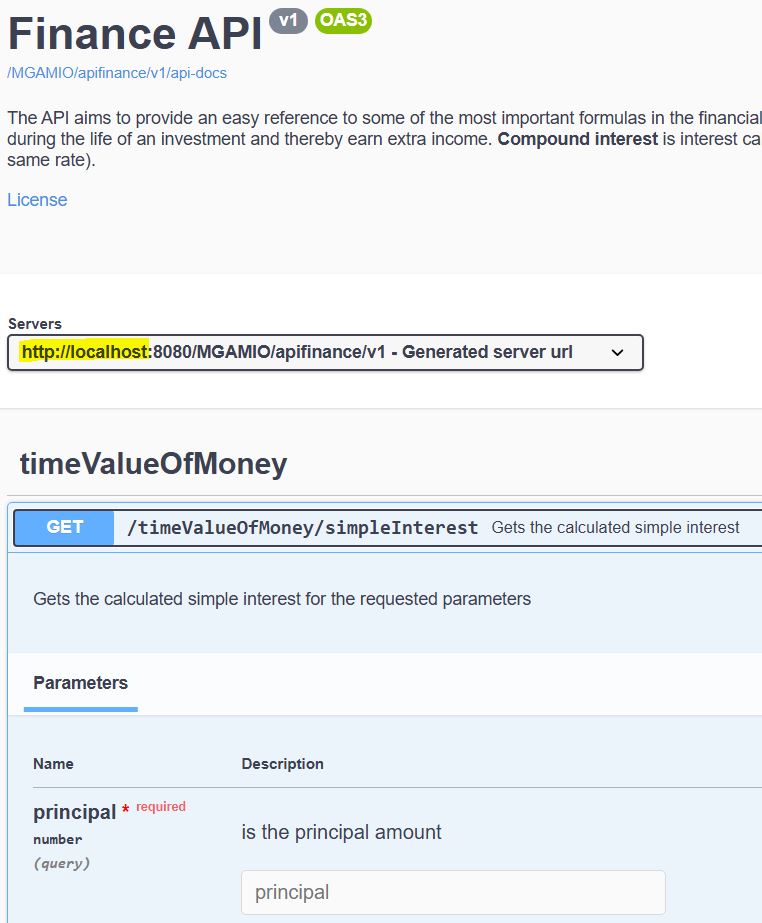
You can view the API documentation in Swagger UI at:
http://localhost:8080/MGAMIO/apifinance/v1
Here is the exported code from codegen:
Generate the Code from the Command Line
When I generated this project, Swagger Editor offered the Codegen -> Server Stub option. By the time I wrote this post, that option was no longer available. You can still generate the same code with the free command-line tool.
Make sure you use version 3.x: the 2.x line, which is still the default branch on GitHub, doesn’t support OpenAPI 3.
1
2
3
4
5
# 1. Download the Swagger Codegen 3 CLI (Java 8+ required)
curl -O https://repo1.maven.org/maven2/io/swagger/codegen/v3/swagger-codegen-cli/3.0.82/swagger-codegen-cli-3.0.82.jar

# 2. Generate a Spring Boot server from your spec
java -jar swagger-codegen-cli-3.0.82.jar generate -i apifinance.yaml -l spring -o spring-server-generated
No cloning and no building. It’s one download and one command.
Summary
Swagger Codegen takes an OpenAPI definition and converts it into client-side or server-side code in various languages. In the case of server-side code generation, the generated code constitutes a complete application with a framework based on controllers and services. It contains snippets with mock data, so it can execute immediately. The blanks need to be filled with the application’s business logic, such as retrieving data from a database.
Tip: treat generated code as disposable. Don’t add business logic to the generated controllers, or you’ll lose it the next time you regenerate. Put it in your own service classes, which the controllers call.
Next: implement the service and build the same Finance API with Spring Boot, Gradle and OpenAPI.
Code generators write the boilerplate. Interviews test the code nobody can generate for you: the algorithms. Practice them on real interview questions:
“If this article helped you, help me create the next one.”
☕ Buy me a coffee