
Access Denied When Deleting Files in a Load-Balanced Java Cluster
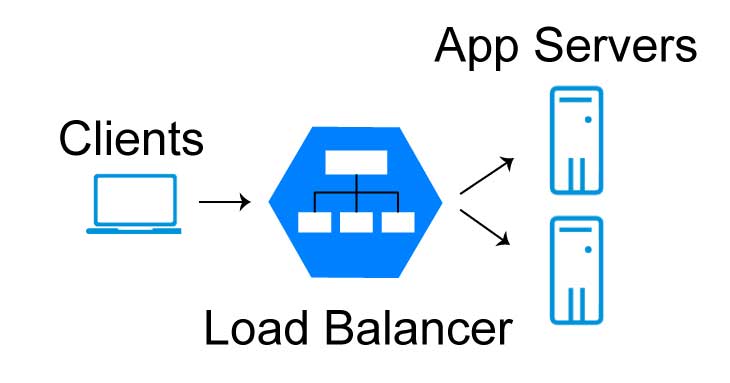
Your Java application runs on two servers behind a load balancer. Both write images to the same file server. Everything works, until one day old images stop being deleted, and nobody gets an error. This post explains what a load balancer and a cluster do, why the second server can’t delete files that the first one created, why Java’s File.delete() hides the problem, and three ways to fix it.
Load Balancers and Clusters
A load balancer sits in front of a group of servers (a server pool) and decides which server handles each incoming request. Common load-balancing algorithms are:
- Round robin: server 1, server 2, server 1, server 2…
- Least connections: the server with the fewest active requests gets the next one.
- IP hash: the client’s IP address decides the server, so the same client usually lands on the same server.
A cluster is a group of application servers that run the same application and are managed together, for example in WebSphere, WildFly or a Kubernetes deployment. A cluster gives you two things:
- Scalability: more servers handle more load and give better throughput.
- High availability: if one server fails, the others keep working.
Load balancing is one of the most effective ways to make an application faster under load. For the other ways, see Optimize Java App Performance.
The Problem: One Server Creates, the Other Can’t Delete
Our Java application downloads images from an external REST API and stores them on an internal file server. It runs in a cluster with two application servers.
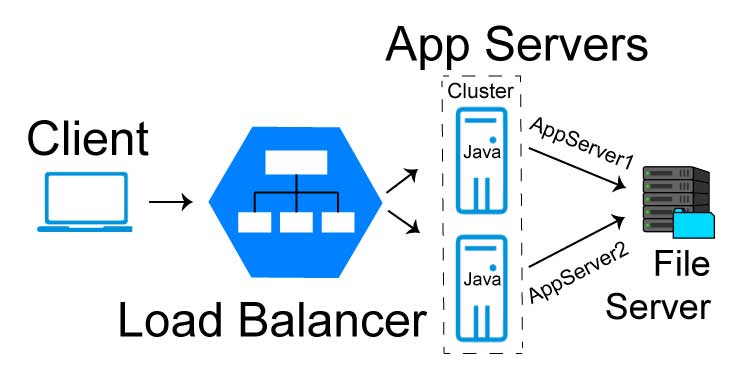
The first time the job runs, the load balancer sends it to AppServer1. The images it stores belong to the account that AppServer1 runs under:
1
2
\\fileserver\images\image1.jpg   (owner: CORP\AppServer1$)
\\fileserver\images\image2.jpg   (owner: CORP\AppServer1$)
A week later the job runs again. An image was deleted in the external API, so our copy must be deleted too. This time the load balancer picks AppServer2, which runs under a different account. Windows refuses: Access is denied. Sticky sessions don’t help here, because they keep one user on one server for a short session, not a job that runs once a week.
Why Nobody Noticed: File.delete() Doesn’t Throw
The original code looked like this:
1
2
3
4
5
6
7
8
public void deleteFile(String fileName) {
  try {
    File file = new File(OUTPUT_FILE_LOCATION + fileName);
    file.delete();
  } catch (Exception e) {
    logger.error("Exception in deleteFile " + e.getMessage());
  }
}
The catch block looks safe, but it never runs. File.delete() doesn’t throw an exception when it fails; it returns false. The code ignores the return value, so the file stays on the server and the log stays empty.
Files.delete() and Files.deleteIfExists() from java.nio.file throw an exception that tells you why the delete failed. I removed the delete permission from a file on Windows and called both:
1
2
File.delete() returned false, exists: true
Files.delete() threw java.nio.file.AccessDeniedException: C:\...\images\image1.jpg
Here is the fixed method. Let the exception reach the caller, so the job can report the failure:
1
2
3
4
5
6
7
8
9
10
private static final Path IMAGES_DIR = Path.of("\\\\fileserver\\images");

public void deleteImage(String fileName) throws IOException {
  Path image = IMAGES_DIR.resolve(fileName);
  if (Files.deleteIfExists(image)) {
    logger.info("Deleted {}", image);
  } else {
    logger.info("{} was already deleted", image);
  }
}
Note the path: \\fileserver\images instead of a mapped drive such as U:\. A mapped drive belongs to the logged-in user, and an application server that runs as a service often can’t see it at all.
Java can change file permissions, for example with Files.setPosixFilePermissions on Linux or AclFileAttributeView on Windows. But AppServer2 can’t use that to fix the problem: changing the permissions of a file requires rights that its account doesn’t have. The fix belongs in the configuration, not in the code.
Why does File.delete() return false instead of throwing? Small API details like this come up in Java interviews:
Three Ways to Fix It
1. Run every server under the same account. Configure AppServer1 and AppServer2 to run as one service account, such as CORP\svc-images. Every file then has the same owner, and every server can delete it. This is the simplest fix.
2. Give a group permission on the folder. Create a group, add the accounts of all application servers, and give the group Modify rights on the folder. With inheritance, every new file gets the same rights:
1
icacls \\fileserver\images /grant "CORP\ImageWriters:(OI)(CI)M"
(OI)(CI) means that files and subfolders inherit the permission, and M means Modify, which includes delete. Remember that the share permissions must allow it too. On Linux, deleting a file depends on write permission on the directory, so a shared group with write access to the directory (and no sticky bit) solves the same problem.
3. Use storage that doesn’t care which server writes. Store the images in object storage such as Amazon S3, Azure Blob Storage or MinIO. Every server uses the same credentials, so the question of who owns a file disappears. This is the usual choice for cloud and Kubernetes deployments, where servers come and go.
What about deploying the application on only one server? It removes the error, but also the high availability, which is the reason to have a cluster. If the problem is a scheduled job that should run only once, keep the cluster and make sure that only one server runs the job at a time, for example with ShedLock.
Key Takeaways
- A load balancer can send the same job to a different server each time. Never assume that the server that created a file is the one that will change it.
File.delete()returnsfalseinstead of throwing. UseFiles.delete()orFiles.deleteIfExists(), which throwAccessDeniedException.- Use network paths like
\\fileserver\images, not mapped drives. - Fix permissions with one service account, a group with Modify rights, or object storage.
Shared files are one example of shared state, and shared state is what makes distributed systems hard: who owns the data, what happens when two servers change it, and what happens when one of them fails. This book explains it better than any other:
Load balancers, clusters and shared state are standard topics in system design interviews. When an external API fails instead, read how a REST client should handle a 503 error. This book takes you the rest of the way, to systems that hold up under millions of users:

“If this article helped you, help me create the next one.”
☕ Buy me a coffee