
Load-Test Your API's Rate Limiting with Concurrent Java Clients
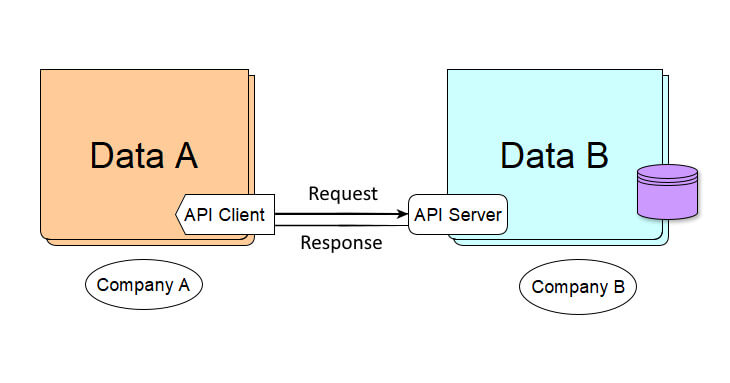
Your API has rate limiting. But does it actually work when several clients hammer different endpoints at the same time, on Black Friday? You don’t want to find out in production. This client fires concurrent requests at your API and shows exactly when the limit kicks in.
We will build a client application that consumes different endpoints of a RESTful web service (the API server) at the same time, to test the Rate Limiting algorithm implemented on the server.
The client uses Spring’s RestTemplate, a synchronous client for HTTP requests.
A note for 2026: this client uses
OAuth2RestTemplatefrom the deprecated Spring Security OAuth project. The concurrency technique in this post works the same with a modern client; see Replace OAuth2RestTemplate with RestClient.
One Interface, One Method
Every simulated client implements the same interface with a single method:
1
2
3
4
5
6
7
8
public interface IClientAPI {

  String apiHost = "<here_your_api_host>";
  String tokenUri = apiHost + "/oauth/token";
  String url = apiHost + "/v1/";

  void callEndpoint();
}
The First Client: Suppliers
The first implementation simulates an external client that requests data from the Supplier endpoint, 60 times in a row:
1
2
3
4
5
6
7
8
9
10
11
12
13
14
15
16
17
18
19
20
21
22
23
24
25
26
27
28
29
30
31
32
33
34
35
public final class GetSuppliers implements IClientAPI {

  private static final Logger logger = LoggerFactory.getLogger(GetSuppliers.class);
  private static final int NRO_REQUESTS = 60;

  private final String clientName;
  private final OAuth2RestTemplate restTemplate;

  public GetSuppliers(String clientName, String clientId, String secret) {
    this.clientName = clientName;
    this.restTemplate = buildRestTemplate(clientId, secret);
  }

  @Override
  public void callEndpoint() {
    for (int idx = 1; idx <= NRO_REQUESTS; idx++) {
      HttpHeaders headers = new HttpHeaders();
      headers.set("NroClientRequest", String.valueOf(idx));
      HttpEntity<String> entity = new HttpEntity<>(headers);
      try {
        ResponseEntity<List<Supplier>> response = restTemplate.exchange(url + "suppliers",
            HttpMethod.GET, entity, new ParameterizedTypeReference<List<Supplier>>() {});
        logger.info("{} request {}: {} X-Rate-Limit-Remaining={}", clientName, idx,
            response.getStatusCode().value(), response.getHeaders().getFirst("X-Rate-Limit-Remaining"));
      } catch (HttpClientErrorException.TooManyRequests e) {
        logger.warn("{} request {}: 429 Too Many Requests, retry after {} ms", clientName, idx,
            e.getResponseHeaders().getFirst("X-Rate-Limit-Retry-After-Milliseconds"));
      } catch (Exception e) {
        logger.error("{} request {}: {}", clientName, idx, e.getMessage());
      }
    }
  }

  //buildRestTemplate(...) omitted for brevity
}
A few details matter here:
ParameterizedTypeReference<List<Supplier>>tells Spring the full generic type of the response. PassingList.classinstead doesn’t compile when the result is aResponseEntity<List<Supplier>>.- The fields are instance fields, not
static: each client object has its own name and its ownRestTemplate, so several clients can run side by side without overwriting each other. RestTemplatethrows an exception for error responses. The 429 we’re testing arrives asHttpClientErrorException.TooManyRequests, so that’s where we read the server’sX-Rate-Limit-Retry-After-Millisecondsheader.
Rate limiting is one of the design decisions that keep an API up under load. For more decisions like it, explained with real examples:

The Second Client: Buyers
In the same way, we implement a second client that requests the Buyer endpoint, this time 140 times:
1
2
3
4
5
6
7
public final class GetBuyers implements IClientAPI {

  private static final int NRO_REQUESTS = 140;

  //same structure as GetSuppliers, calling url + "buyers"
  //with new ParameterizedTypeReference<List<Buyer>>() {}
}
callEndpoint returns nothing: what we want is to see in the log when the server starts refusing requests.
Run the Clients at the Same Time
To make the clients hit the API simultaneously, each one needs its own thread. With Java 21, the simplest way is an executor that starts a virtual thread for every task:
1
2
3
4
5
6
7
8
9
10
11
12
13
14
public class RESTFulParallelClientsTest {

  public static void main(String[] args) {
    List<IClientAPI> clients = List.of(
        new GetSuppliers("suppliers-1", "<here_clientId>", "<here_secret>"),
        new GetBuyers("buyers-1", "<here_other_clientId>", "<here_other_secret>"));

    try (ExecutorService executor = Executors.newVirtualThreadPerTaskExecutor()) {
      for (IClientAPI client : clients) {
        executor.submit(client::callEndpoint);
      }
    }   // close() waits until every client has finished
  }
}
Want a heavier test? Add more clients to the list, for example three buyer clients sharing the same credentials. Virtual threads are cheap, so hundreds of simulated clients are no problem.
Why not use ForkJoinPool.commonPool()? Its size is the number of CPU cores minus one, and it’s designed for computation, not for waiting on the network. On a 2-core machine, such as a small build server, it has a single thread, so the two clients run one after the other. In a test where each client waited one second, the common pool took 2 seconds on 2 cores, while the virtual-thread executor took 1 second.
On Java 17, use a fixed thread pool with one thread per client instead:
1
2
3
4
ExecutorService executor = Executors.newFixedThreadPool(clients.size());
clients.forEach(client -> executor.submit(client::callEndpoint));
executor.shutdown();
executor.awaitTermination(10, TimeUnit.MINUTES);
Each client is submitted as a Runnable, because callEndpoint returns no result and handles its own errors. A Callable is the alternative when a task must return a result or may throw a checked exception. See Executors for the other thread pools Java offers.
What You’ll See
Suppose the API server allows 90 requests per minute on the buyers endpoint and 100 on the suppliers endpoint. Here is the log of a run against a test server with exactly these limits:
1
2
3
4
5
6
7
8
9
10
16:12:11.145 INFO GetBuyers - buyers-1 request 1: 200 X-Rate-Limit-Remaining=89
16:12:11.145 INFO GetSuppliers - suppliers-1 request 1: 200 X-Rate-Limit-Remaining=99
...
16:12:11.473 INFO GetSuppliers - suppliers-1 request 60: 200 X-Rate-Limit-Remaining=40
...
16:12:11.611 INFO GetBuyers - buyers-1 request 89: 200 X-Rate-Limit-Remaining=1
16:12:11.620 INFO GetBuyers - buyers-1 request 90: 200 X-Rate-Limit-Remaining=0
16:12:11.629 WARN GetBuyers - buyers-1 request 91: 429 Too Many Requests, retry after 37000 ms
16:12:11.634 WARN GetBuyers - buyers-1 request 92: 429 Too Many Requests, retry after 37000 ms
...
Both clients start in the same millisecond, so they really run in parallel. The buyers client gets 90 successful responses, then 50 refusals with status 429 (requests 91 to 140), and the server tells it to retry after 37 seconds. The suppliers client stays under its limit.
Beyond Rate Limiting
The same client is a simple load test. Point it at your test environment with more clients and more requests, and watch your server’s thread pool, database connections and response times, especially before critical business days such as Black Friday. If the server struggles, the performance playbook shows where to start.
Concurrency questions come up in almost every senior Java interview: Runnable vs Callable, what virtual threads are, how a thread pool works. Practice with real interview questions:
“If this article helped you, help me create the next one.”
☕ Buy me a coffee