UML Diagrams for Java Developers: From Requirements to Code
The Unified Modeling Language (UML) is a graphical notation for modeling software systems. UML diagrams are not just pretty pictures: they communicate design decisions to the developers who build the system, before anyone writes code.
In this article, you’ll take one small business requirement and turn it into diagrams, from the big picture down to the classes, and then into Java code. Along the way, you’ll learn the relationships that confuse most developers: dependency versus association, and aggregation versus composition.
In this article 12 sections
- The Use Case
- The User Requirement
- Why Do We Model?
- From the Big Picture to the Code: the C4 Model
- UML Class Diagrams
- Relationships Between Classes
- UML Sequence Diagrams
- Relationships Among Objects
- UML to Java Cheat Sheet
- Use Aggregation and Composition to Design REST APIs
- Diagrams as Code
- Conclusions
The Use Case
Small business owners often pay for expensive advertising. A simple application that generates printable flyers can save them money, and it makes a good design exercise.
The User Requirement
Given a text message, a URL link and an image, build a service that composes a flyer with the image, the text and a QR code for the link. The result is an A4 PDF file divided into one, two, four or eight flyers, ready to print.
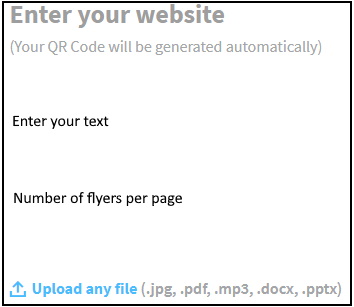
From this requirement, we can identify three tasks: create a QR code, combine the QR code, text and image into one design, and create a PDF file. Whether we write the code ourselves or use libraries, the result should look like this:

Different developers can read the same requirement in different ways. A shared notation removes this ambiguity from the start.
Why Do We Model?
- To understand the system before we build it.
- To discuss the design with the team while changes are still cheap.
- To document the decisions we made, and why.
- To speed up implementation, because technical problems come up during design, not in the middle of coding.
From the Big Picture to the Code: the C4 Model
The C4 model describes software at four levels of detail, like zooming in and out on a map: Context, Containers, Components and Code. UML is the usual notation for the last level, the code.
Context Diagram
The context diagram shows the big picture: people and software systems, not technologies. For our use case, a new web application fulfills the user requirement.

Container Diagram
The container diagram shows the applications and data stores, the separately running units, and how responsibilities are split among them. Our web application needs a form in the front end and an API application in the back end.

Component Diagram
Inside the API application, we give each sub-task to a separate component. Each component has one responsibility, as the Single Responsibility Principle recommends. Read more in SOLID Principles.
- The QR Service generates a QR code for the link.
- The Image Service combines the QR code, the message and the image into one design.
- The PDF Service puts the design on an A4 page, once, twice, four or eight times.

In this diagram, the controller calls the three services itself. It’s better to add one more class, FlyerComposerService, between the controller and the services. It coordinates the three calls, keeps the controller thin, and makes it easier to move the services into separate microservices later.
UML Class Diagrams
A class is a template for creating objects. A UML class box has three compartments:
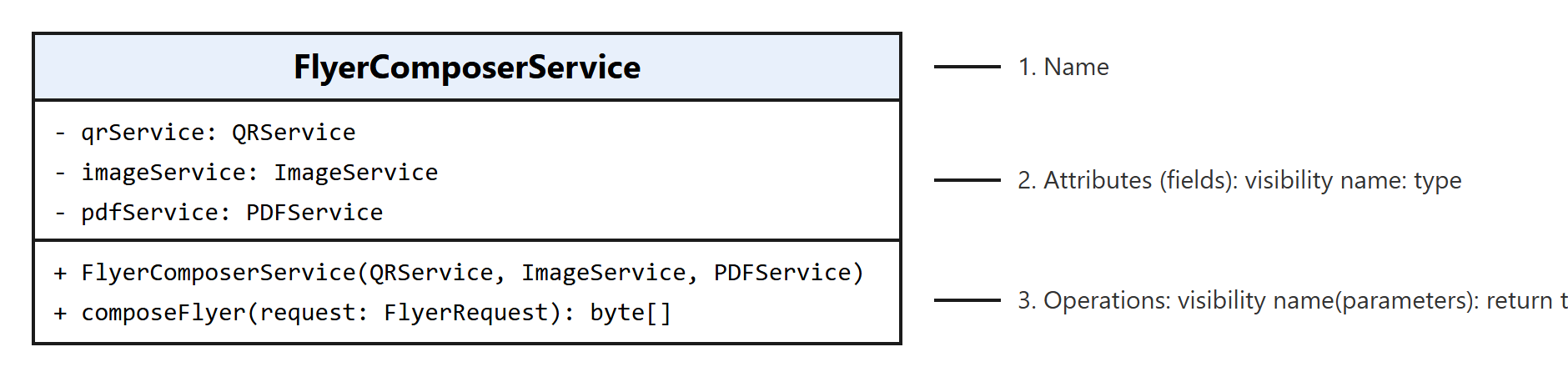
- The name of the class.
- The attributes, with their visibility (
-private,+public,#protected), name and type. - The operations, with their visibility, parameters and return type.
Here is the same class in Java. The services are passed in through the constructor, which is how Spring injects dependencies:
1
2
3
4
5
6
7
8
9
10
11
12
13
14
15
16
17
18
19
@Service
public class FlyerComposerService {

  private final QRService qrService;
  private final ImageService imageService;
  private final PDFService pdfService;

  public FlyerComposerService(QRService qrService, ImageService imageService, PDFService pdfService) {
    this.qrService = qrService;
    this.imageService = imageService;
    this.pdfService = pdfService;
  }

  public byte[] composeFlyer(FlyerRequest request) {
    byte[] qrCode = qrService.generateQRCode(request.link());
    byte[] design = imageService.composeImage(qrCode, request.message(), request.image());
    return pdfService.createPdf(design, request.layout());
  }
}
The requirement allows only one, two, four or eight flyers per page. An int would accept any number, so we model the choice as an enum, and we group the user’s input in a record:
1
2
3
4
5
6
7
8
9
10
11
12
13
14
15
public enum FlyerLayout {
  ONE(1), TWO(2), FOUR(4), EIGHT(8);

  private final int flyersPerPage;

  FlyerLayout(int flyersPerPage) {
    this.flyersPerPage = flyersPerPage;
  }

  public int flyersPerPage() {
    return flyersPerPage;
  }
}

public record FlyerRequest(String message, String link, byte[] image, FlyerLayout layout) {}
Relationships Between Classes
Dependency vs. Association
Many developers draw every relationship as a dependency, especially in Spring projects, where everything is called a “dependency”. UML makes a clear distinction:
- Association (solid line, open arrow): the class keeps a reference to the other class in a field.
FlyerComposerServicehas the fieldsqrService,imageServiceandpdfService, so it has three associations. The field names become the role names on the lines. - Dependency (dashed line, open arrow, often labeled «use»): the class uses the other class only for a moment, as a method parameter, a local variable or a return type.
FlyerComposerServicereceives aFlyerRequestas a parameter but doesn’t store it, so that’s a dependency.
In short: a field is an association; anything else the class only uses is a dependency.
Realization
Realization (dashed line, hollow triangle) means that a class implements an interface. QRServiceImpl realizes QRService. Because FlyerComposerService depends only on interfaces, you can replace an implementation, for example with a different QR library, without changing the composer. Read more in The Open-Closed Principle.
The Complete Class Diagram
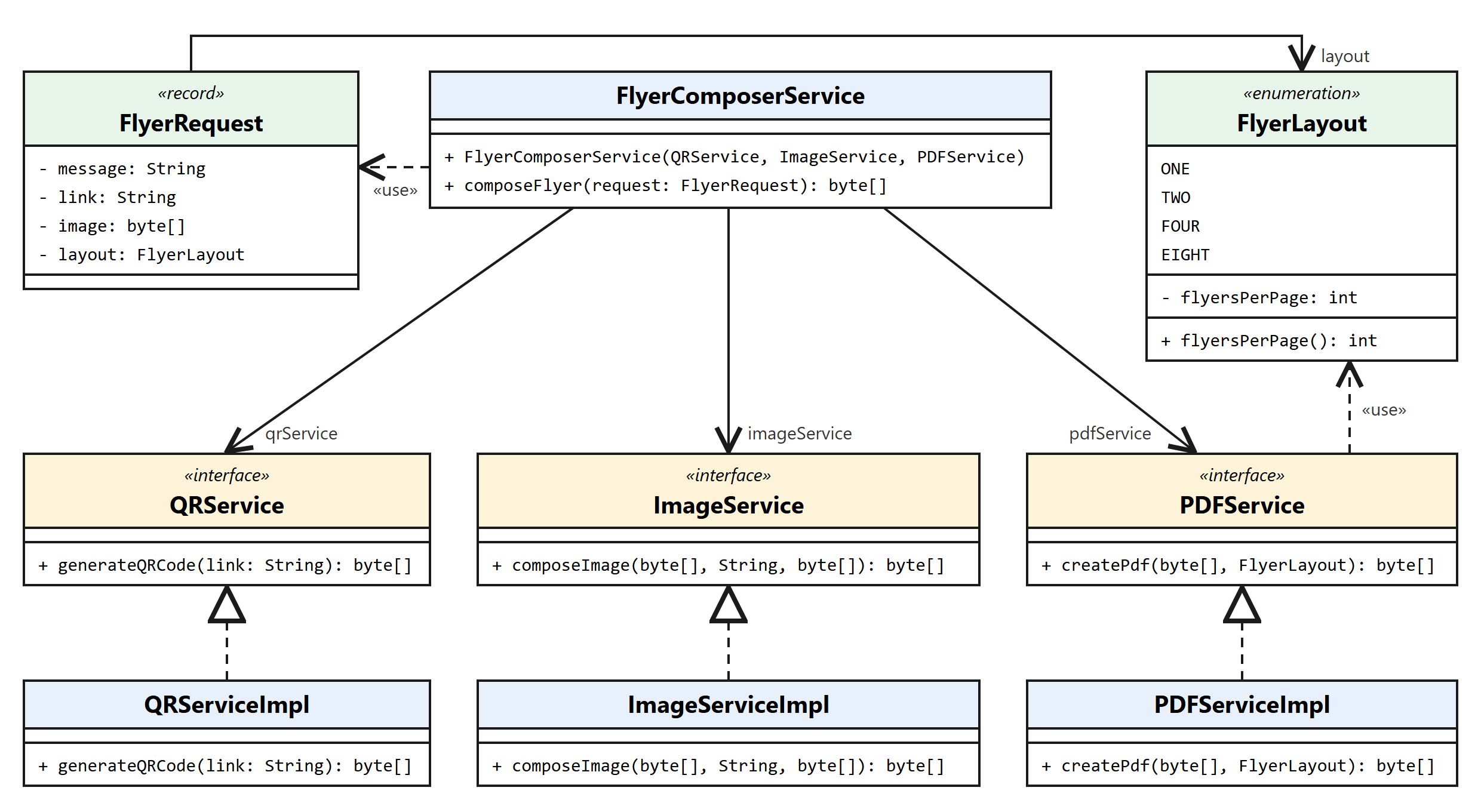
The code follows the diagram directly. The interface:
1
2
3
public interface QRService {
  byte[] generateQRCode(String link);
}
And its implementation:
1
2
3
4
5
6
7
8
@Service
public class QRServiceImpl implements QRService {

  @Override
  public byte[] generateQRCode(String link) {
    // generate the QR code image, for example with the ZXing library
  }
}
UML Sequence Diagrams
A class diagram shows the structure: which classes exist and how they’re related. It doesn’t show the order of the calls. A sequence diagram does. Here is what happens when the controller calls composeFlyer:
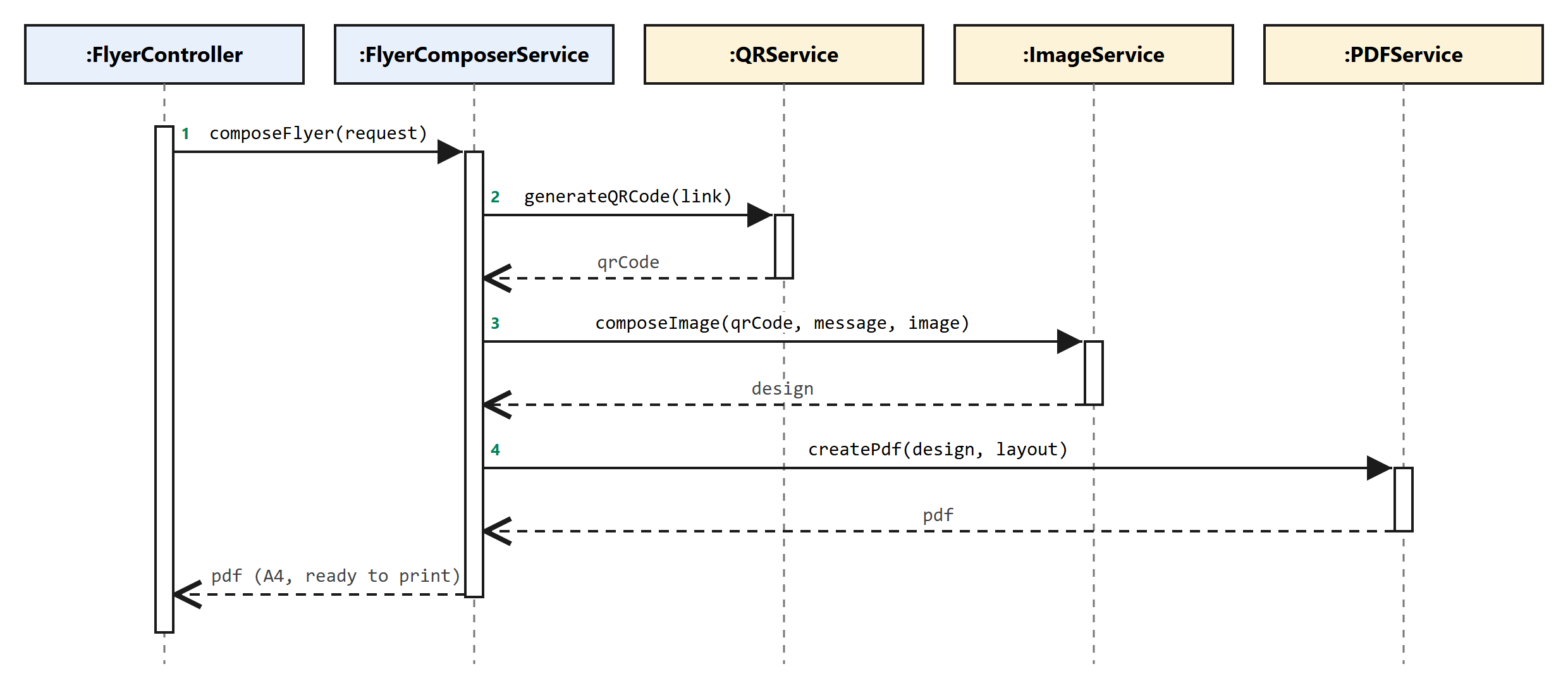
Each vertical dashed line is an object’s lifeline. Solid arrows are calls, dashed arrows are return values, and the narrow boxes show when an object is active. The diagram matches the three lines of composeFlyer exactly. Draw a sequence diagram whenever the order of the calls matters, for example when you explain a flow to the team or plan error handling.
Design interviews often start with “Sketch the classes for this problem.” Practicing with real interview questions helps you draw and explain a design under time pressure:

Relationships Among Objects
Objects work together to do something useful: one object calls another to use its operations. Association, aggregation and composition describe how objects are connected. OOP Concepts in Java explains the foundations behind these decisions.
Association
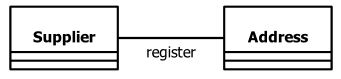
An association is a solid line between two classes. You can name it with a verb from the business domain, such as register below. An arrow on one end shows which class holds a reference to the other; without arrows, the direction is left open.
Aggregation
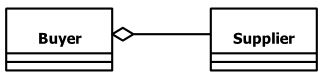
Aggregation is a has-a association, drawn with a hollow diamond on the side of the whole. The parts can exist without the whole: a buyer works with suppliers, but if you delete the buyer, the suppliers still exist.
1
2
3
4
5
6
7
8
public class Buyer {

  private final List<Supplier> suppliers = new ArrayList<>();   // the suppliers exist on their own

  public void addSupplier(Supplier supplier) {
    suppliers.add(supplier);
  }
}
Composition
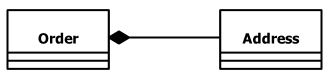
Composition is a stronger aggregation, drawn with a filled diamond. The whole owns its parts, and the parts are deleted with the whole: if you delete an order, its shipping address is deleted too.
1
2
3
4
5
6
7
8
public class Order {

  private final Address shippingAddress;   // created and owned by the order

  public Order(String street, String city) {
    this.shippingAddress = new Address(street, city);
  }
}
In JPA, composition usually means @OneToMany(cascade = CascadeType.ALL, orphanRemoval = true) or an @Embedded value: the database deletes the parts together with the whole.
UML to Java Cheat Sheet
| Relationship | UML notation | In Java |
|---|---|---|
| Dependency | Dashed line, open arrow | Parameter, local variable or return type |
| Association | Solid line, open arrow | A field |
| Aggregation | Solid line, hollow diamond at the whole | A field holding parts that live on their own |
| Composition | Solid line, filled diamond at the whole | A field holding parts the whole creates and owns |
| Generalization | Solid line, hollow triangle | extends |
| Realization | Dashed line, hollow triangle | implements |
The authors of UML explain every diagram type and relationship, with many examples, in The Unified Modeling Language User Guide. It’s the reference to keep on your desk once your diagrams grow beyond a few classes:
Use Aggregation and Composition to Design REST APIs
Aggregation and composition diagrams also help you design REST API endpoints. The following diagram shows the relationships among the business objects of a purchasing system:
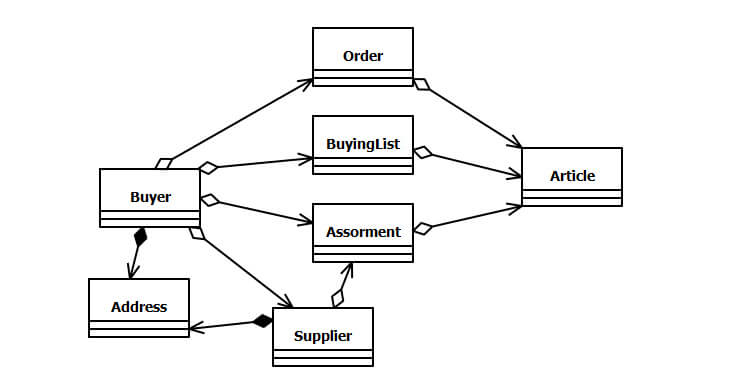
The has-a relationships become nested resources. To get the orders of a buyer:
1
GET /api/v2/buyers/{buyerId}/orders
To get the articles in one of a buyer’s assortments:
1
GET /api/v2/buyers/{buyerId}/assortments/{assortmentId}/articles
Diagrams as Code
Many teams keep their diagrams in the repository, next to the code, so the diagrams change in the same pull request as the code. With Mermaid, which GitHub and GitLab render in Markdown files, part of our class diagram looks like this:
1
2
3
4
5
6
7
8
9
10
11
classDiagram
    class FlyerComposerService {
        +composeFlyer(FlyerRequest request) byte[]
    }
    class QRService {
        <<interface>>
        +generateQRCode(String link) byte[]
    }
    FlyerComposerService --> QRService : qrService
    FlyerComposerService ..> FlyerRequest : uses
    QRServiceImpl ..|> QRService
PlantUML works the same way and is supported by IntelliJ IDEA and most documentation tools.
Conclusions
- UML turns a requirement into a design the whole team understands, before anyone writes code.
- The C4 model takes you from the big picture to the classes. Class diagrams show the structure, and sequence diagrams show the order of the calls.
- A field is an association; a parameter or local variable is a dependency.
- Composition means the whole owns its parts; with aggregation, the parts live on their own.
- Depending on interfaces, not on implementations, keeps the design easy to change.
Choosing the right relationship is a software design decision. My book shows when interfaces, composition and the SOLID principles help, what they cost, and when they make your code worse:

“If this article helped you, help me create the next one.”
☕ Buy me a coffee